

The UNILORIN Post UTME form 2026 is officially out and the portal is live. The University of Ilorin has opened its pre-admission screening registration for the 2026/2027 academic session, and if you selected UNILORIN as your first-choice institution, you need to act fast.
This guide covers everything concerning who can apply, what to prepare, how to fill the form, and critical rules that could make or break your admission.
What Is the UNILORIN Post UTME Form 2026?
The UNILORIN Post UTME form 2026 is the official pre-admission screening form released by the University of Ilorin for candidates seeking undergraduate admission in the 2026/2027 academic session.
Both UTME and Direct Entry (DE) candidates are required to complete this form through the university’s official online portal. Completing it is not optional, and without it, you cannot be considered for admission.
Who Is Eligible to Apply UNILORIN Post UTME?
To access and complete the UNILORIN Post UTME form 2026, you must have:
- Selected University of Ilorin as your first-choice institution during the 2026 UTME or Direct Entry registration
- Scored at least 180 in JAMB
- At least five O’Level credits in relevant subjects including English Language and Mathematics in not more than 2 sittings (Note: Only one sitting is accepted for MBBS, Pharmacy, Optometry & Vision Science, and Computer Engineering).

Screening Exemptions:
Candidates from outside Nigeria who applied via UTME or Direct Entry are not required to sit the screening test, they will be screened after admission.
Candidates with recognised disabilities, including the blind, deaf, mute, autistic, amputees, those with Down syndrome, Dyslexia, ADHD, albinism, cerebral palsy, and disfigurement, are also exempted from the test.
DOWNLOAD UNILORIN POST UTME PAST QUESTIONS
The University of Ilorin Post UTME past questions are now available for download on the Exam Scholars CBT Practice App. Available on mobile and PC devices. Past questions are verified across various years, and available for students across all discipline.
UNILORIN Post UTME Form 2026 Registration Dates
The registration window for the UNILORIN Post UTME form 2026 is extremely tight:
Opening Date: Monday, 22nd June 2026
Closing Date: Sunday, 5th July 2026 at 23:59pm
That is under two weeks. The portal will shut at midnight on July 5 and no extension has been announced.

How UNILORIN Admission Score Will Be Calculated
Before you fill the UNILORIN Post UTME form 2026, understand how your final admission score works. It is not based on UTME alone. UNILORIN uses an aggregate of three components:
UTME/A’Level Score — 50%
Post-UTME Screening Score — 30%
Five (5) Relevant O’Level Grades — 20%
Your O’Level results carry real weight, so make sure the correct grades are uploaded on JAMB CAPS before submitting.
What to Prepare Before Filling the Form
Have these ready before you open the UNILORIN Post UTME form 2026 portal:
- JAMB Registration Number
- National Identification Number (NIN)
- O’Level Result Checker/Scratch Card PIN
- A personal, active email address. Your login details will be sent here
- A personal mobile number
- A valid ATM card (Visa or Mastercard) for the ₦2,000 registration fee
Note: there will be additional post-registration charges for NIN and O’Level result verification.
How to Apply For UNILORIN Post UTME 2026
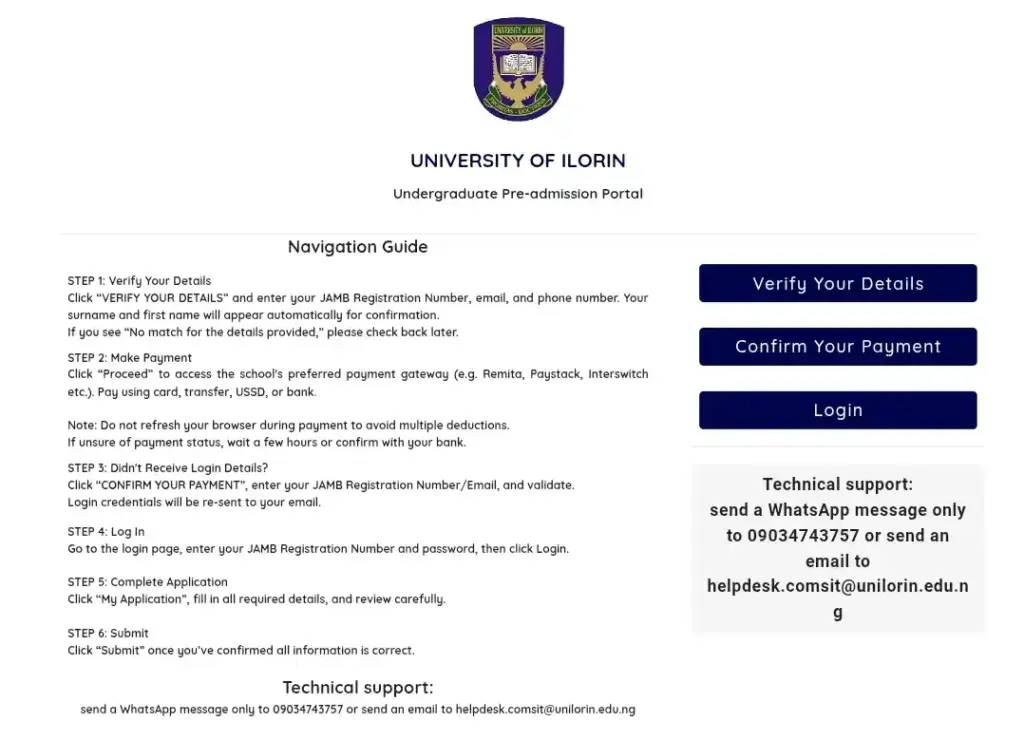
Follow these steps exactly as outlined on the UNILORIN portal:
- Visit the OFFICIAL UNILORIN PORTAL and click “Post-UTME Registration.”
- Click “Verify your details” on the right side of the Undergraduate Pre-Admission page.
- Enter your JAMB Registration Number, phone number, and email address. Your name will display automatically for confirmation.
- Click “Verify” to go to the payment page.
- Click “Make Payment” and complete payment via Remita using your ATM card.
- CONFIRM YOUR PAYMENT. After payment, your login details will be sent to your email.
- Log in, complete NIN verification, and enter your O’Level/A’Level details.
- After Log in, click “My Application” and fill all details out carefully.
- Review every entry carefully, then click “Submit.”
- Print your screening slip and verify all information is correctly displayed.
Payment tip: If unsure whether payment went through, wait a few hours for a bank debit alert, return to the portal and click “Confirm your Payment”
Critical Rules You Must Read Before Submitting
Getting the UNILORIN Post UTME form 2026 wrong can cost you your admission and wrong entries automatically disqualify you.
- Do not change your course on the UNILORIN portal. All course changes must be done on JAMB e-Facility (CAPS). UNILORIN downloads updates from CAPS periodically, but not after the portal closes.
- Candidates awaiting O’Level results should select ‘AR’ (Awaiting Results).
- After submission, confirm that O’Level details and NIN on the UNILORIN portal match exactly what is on JAMB CAPS.
Errors or complaints? Email admissions@unilorin.edu.ng before the portal closes.
Don’t Submit the UNILORIN Post UTME Form 2026 at the Last minute. Last minute submissions risk bank delays, portal congestion, and entry errors. Fill the UNILORIN Post UTME form 2026 today, print your slip, and double-check every detail before the portal shuts. For official updates, visit www.unilorin.edu.ng and follow Exam Scholars Good luck!




Pingback: UNILORIN Medicine And Surgery: Requirements, Cut Off Mark, And Latest News About UNILORIN Admission | Exam Scholars- JAMB Exam